Shop Page Views
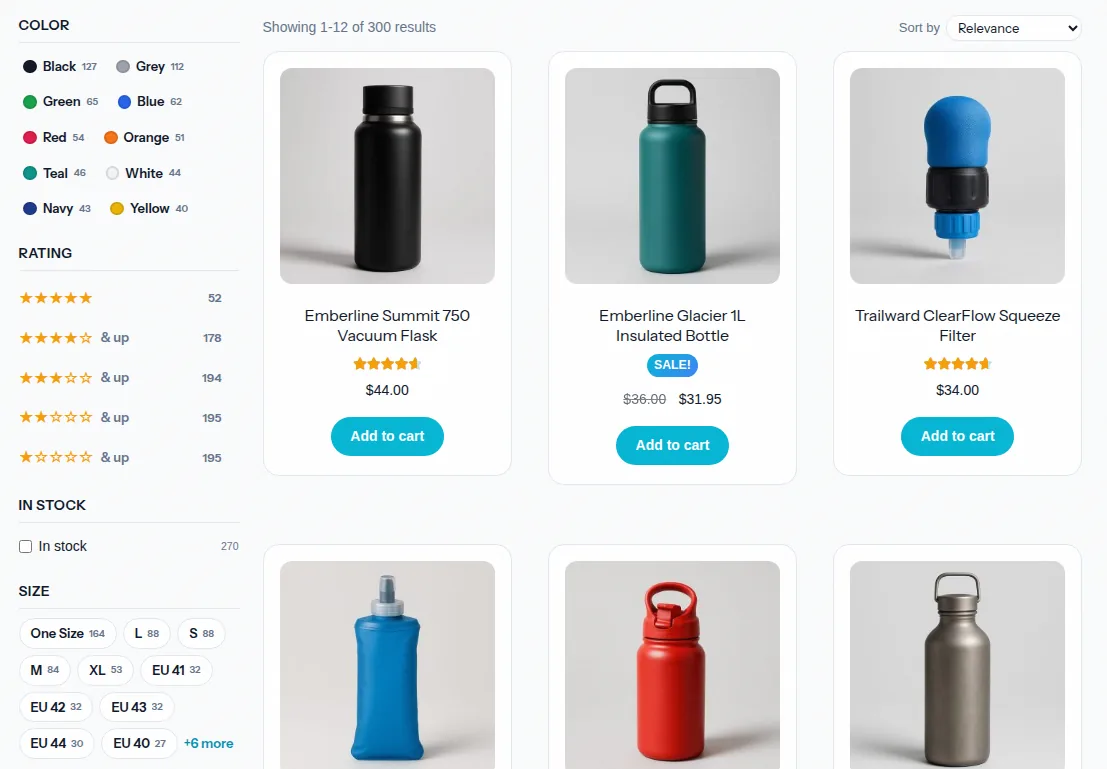
Replace the default WooCommerce shop catalog with a saved CelerSearch View. Instead of the native product loop plus the auto-injected filter bar, the shop page runs a full View — instant search, your custom-built facets (color swatches, range sliders, pills…), and AJAX pagination.
Setup
- Create a View on your products index (CelerSearch → Views) and design its facets — see the Facet Builder.
- Go to Settings → Search Areas and edit (or add) the WooCommerce Shop Browse area.
- Enable Replace shop page with a View, pick your View, and choose whether to also apply to category/tag archives.
- Save. The shop page now renders the View.
What Changes
- The native product loop is replaced. The main product query is skipped entirely — products come from a single search-engine request made by the View. No double querying.
- The filter bar steps aside. The auto-injected Shop Filters bar disables itself wherever the View is active; the View's facets are the filter UI.
- Your theme still frames the page. The template preserves WooCommerce's wrapper hooks (
woocommerce_before_main_content/woocommerce_after_main_content), the archive title viawoocommerce_page_title(), the archive description, and the sidebar hook — so the page keeps your theme's shop layout.
Category & Tag Archives
With include archives on, product_cat / product_tag (and attribute) archives run the same View scoped to the term. The scoping uses the indexed hierarchical path, so a parent category like Accessories matches every product in its subtree, not just products directly assigned to it. The archive context is fixed — it doesn't appear as a removable filter pill, and clearing filters never unscopes the archive.
Product Result Cards
A product View has a Product cards setting (Views editor → Display Options) with two styles:
- Theme (WooCommerce native) — the default. Products render as your theme's own
content-productshop-loop card, server-rendered per page, so they look identical to the rest of your store and fire the same WooCommerce loop hooks other plugins rely on. This is almost always what you want when a View replaces the shop page. - Plugin (custom cards) — CelerSearch's own lightweight card (image with sale badge, title, star rating, sale-aware price, add-to-cart), drawn client-side. Useful on non-WooCommerce themes, or when you want a card that doesn't inherit theme styling.
Either way, WooCommerce data is attached to each hit via the celersearch_view_search_hit
filter (price_html, on_sale, rating_html, add_to_cart_url, stock_status).
Override the plugin card markup from your theme:
your-theme/celersearch/views/search/result-item-product.php
Extra placeholders over the standard result item: {{price_html}}, {{rating_html}}, {{add_to_cart_url}}, {{stock_status}}, and the {{#on_sale}}…{{/on_sale}} conditional block. (Theme-native cards come from your theme's content-product.php, so customize those the WooCommerce way.)
Template Escape Hatch
Themes that replace archive-product.php wholesale (instead of using WooCommerce's wrapper hooks) can swap the page template:
add_filter('celersearch_shop_view_template', function ($path) {
    return get_stylesheet_directory() . '/celersearch/shop-view.php';
});
SEO Notes
- Faceted URLs (any
cs_f_/cs_r_/cs_b_parameter) are markednoindex, followto keep crawl budget on the clean URLs. - The clean shop and archive URLs keep their normal indexability and canonical tags.
Client-rendered catalog
The View fetches and renders products in the browser, so the initial HTML doesn't contain the product list (the filter-bar approach keeps a server-rendered page 1). If server-rendered product markup on the shop page matters to you, stick with Shop Page Filters — both are fully supported.
Next Steps
- Facet Builder — design the facets your shop page uses
- Shop Page Filters — the zero-config alternative
- Template Overrides