Search Views
A View is a saved, reusable search-interface configuration you embed anywhere on the site with the [celersearch] shortcode. Think of it as a named bundle: "blog search", "products grid", "docs finder" — each one pointing at an index with its own behaviour and filter setup.
Why Views?
Instead of repeating a long shortcode with a dozen attributes on every page, you configure the view once in the admin and then reference it by ID:
[celersearch view="3"]
When you want to tune the behaviour sitewide — change the default sort, add a filter group, flip live-search off — you edit the view and every page that uses it updates automatically.
Creating a View
- Navigate to CelerSearch → Views
- Click Add View
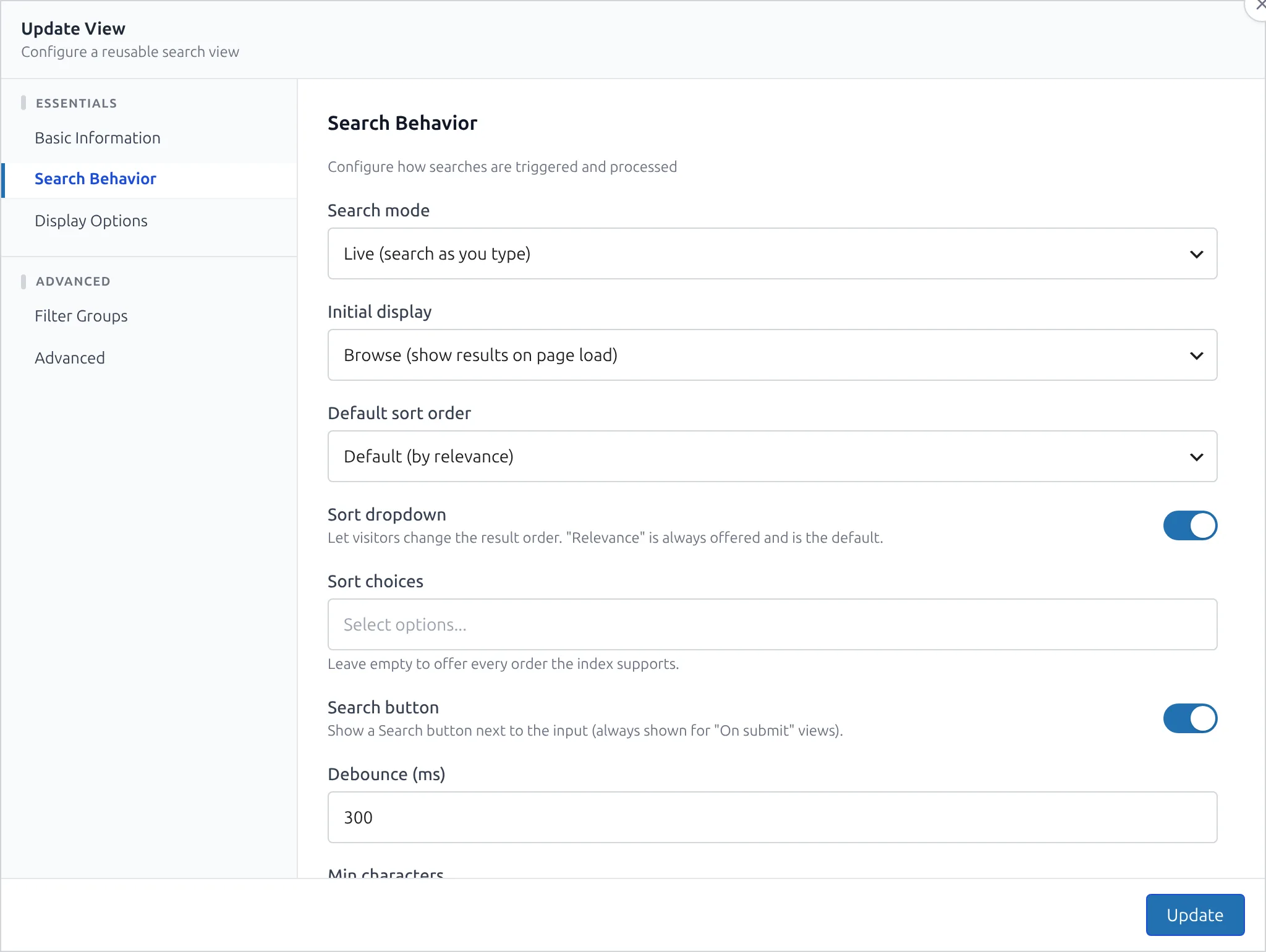
- Fill in the form. The modal is grouped into five sections (sidebar navigation inside the modal):
Basic Information
| Field | Description |
|---|---|
| Name | Internal label shown in the Views list. |
| Index | Which CelerSearch index this view searches. |
Choosing an index unlocks that index's filterable attributes for the Filter Groups section.
Search Behavior
| Field | Values | Default | Description |
|---|---|---|---|
| Mode | live, manual | live | live searches as the user types (debounced); manual waits for form submission. |
| Initial Display | search_only, all | search_only | What to render before a search: just the input or the full results listing. |
| Default Sort | Any sortable attribute on the index | — | Sort applied on the first render and when the user hasn't picked one. |
| Sort dropdown | on / off | off | Adds a "Sort by" selector above the results so visitors can reorder them. "Relevance" is always the first choice; the other entries come from the index — product indexes add Popularity, Average rating and Price (both directions) alongside date and title. Optionally narrow the offered choices with Sort choices. The visitor's pick rides the URL (cs_sort), so sorted result pages can be shared and revisited. |
| Search button | on / off | off | Shows a Search button next to the input. Views in manual mode always render it; for live views it's an optional extra affordance. |
| Debounce (ms) | integer | 300 | Typing pause before a live search runs. Hidden in manual mode. |
| Minimum characters | integer | 2 | Shortest query that triggers a search. |
Display Options
| Field | Default | Description |
|---|---|---|
| Results per page | 12 | Number of hits per page. |
| Placeholder | Search... | Placeholder text on the search input. |
| Highlight matches | on | Wraps matching tokens in <em class="celersearch-highlight">. |
| Product cards (products index) | Theme | Render products as your theme's native WooCommerce card (default) or the plugin's own card. See Shop Page Views. |
Facets
Controls whether a filter sidebar is rendered and what appears in it:
- Show all filter groups — every filterable attribute on the index becomes a checkbox facet.
- Custom facets (builder) — design each facet individually: display type (checkboxes, pills, color swatches, range slider, star rating, toggle…), label, AND/OR matching, value ordering and limits. See the Facet Builder.
- Disable filters — no sidebar at all.
Filterable attribute labels can be adjusted with celersearch_filterable_attribute_labels.
Advanced
| Field | Description |
|---|---|
| CSS class | Extra class added to the view's wrapper — use it to target styling without relying on IDs. |
Using a View
Embed the view by its numeric ID:
[celersearch view="3"]
Inline attributes override the saved configuration for that specific placement:
[celersearch view="3" limit="24" mode="manual"]
See the full attribute list in the Shortcode Reference.
Managing Views
From CelerSearch → Views you can:
- Edit — changes apply immediately to every placement.
- Delete — a confirmation modal guards against accidental deletion.
Styling and Templates
Views render through the plugin's theme-overridable template system. Copy any file from plugins/celersearch/templates/views/search/ into your-theme/celersearch/views/search/ to customise its markup. The rendering pipeline checks child theme → parent theme → plugin, first match wins.
Template paths:
your-theme/
└── celersearch/
    └── views/
        └── search/
            ├── search.php        # Main container (PHP, server-side)
            ├── result-item.php   # Single result (JS, Mustache)
            ├── no-results.php    # Empty state (PHP)
            ├── pagination.php    # Pagination (JS, Mustache)
            ├── facet-group.php   # Facet block (JS, Mustache)
            └── error.php         # Admin-only error panel (PHP)
Full template reference, placeholders, and filter hooks: Template Overrides.
The view markup uses BEM-style classes under a cs-search root, so you can style it without template overrides:
.cs-search { }                 /* root wrapper (plus your custom class) */
.cs-search--no-facets { }      /* modifier when facets are hidden */
.cs-search__input { }
.cs-search__facets { }
.cs-search__facet-group { }
.cs-search__results { }
.cs-search__item { }
.cs-search__item-title { }
.cs-search__item-excerpt { }
.cs-search__pagination { }
.cs-search__no-results { }
.celersearch-highlight { }     /* highlighted tokens inside titles/excerpts */
What's Next?
- Facet Builder — per-facet display types, color swatches, ranges, AND/OR matching
- Shop Page Views — run a view as your WooCommerce shop page
- Shortcode Reference — every attribute and inline override
- Template Overrides — customise view markup from your theme
- Views hooks — PHP filters and actions for views