Shortcode Reference
The [celersearch] shortcode embeds a search view anywhere a shortcode runs (posts, pages, widgets, page builders, theme templates via do_shortcode()).
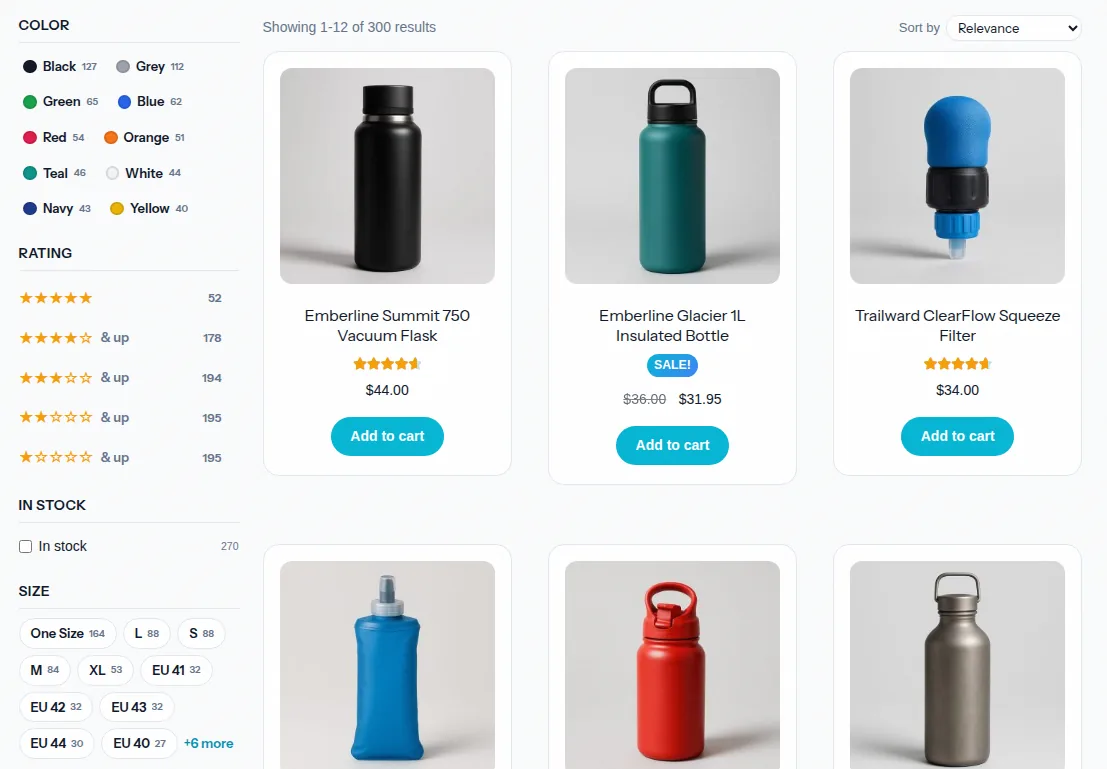
Two Modes
View-based (recommended) — loads the configuration saved in CelerSearch → Views and lets you override individual options inline:
[celersearch view="3"]
Inline (fallback) — pass the config directly without creating a saved view. Useful for quick drops, throw-away pages, or when the index is the only thing you care about:
[celersearch index_id="5" limit="12"]
Either the view attribute (referring to a saved view's ID) or index_id must be present. Inline attributes always override the corresponding value on a saved view.
Attributes
| Attribute | Type | Default | Description |
|---|---|---|---|
view | int | 0 (unset) | Saved view ID from CelerSearch → Views. |
index_id | int | 0 (unset) | Index ID to search. Required when not using view. |
limit | int | 12 | Results per page. |
placeholder | string | Search... | Placeholder text for the search input. |
class | string | "" | Extra CSS classes added to the view wrapper. |
show_facets | bool | true | Render the filter sidebar. Set to false to hide all facets. |
highlight | bool | true | Wrap matching terms in <em class="celersearch-highlight"> in titles and excerpts. |
debounce | int | 300 | Milliseconds to wait after the last keystroke in live mode. |
min_chars | int | 2 | Minimum characters before a search runs in live mode. |
mode | live | manual | live | live searches on every keystroke (debounced). manual waits for form submit. |
initial_display | search_only | all | search_only | What to render before the first search. search_only shows just the input; all also lists results (no query). |
No legacy aliases
layout, columns, per_page, show_images, pagination_style, theme, and filter_style are not recognised — CelerSearch silently ignores unknown attributes. Use the options above and style with CSS or template overrides instead.
Examples
Use a saved view
[celersearch view="2"]
Override a saved view's limit
[celersearch view="2" limit="24"]
Inline without a saved view
[celersearch index_id="5" limit="12" placeholder="Search articles…"]
Hide the filter sidebar
[celersearch view="2" show_facets="false"]
Manual mode (submit to search)
[celersearch view="2" mode="manual"]
Show results immediately on load
[celersearch view="2" initial_display="all"]
Snappier live search
[celersearch view="2" debounce="150" min_chars="1"]
Using the Shortcode in PHP
<?php echo do_shortcode('[celersearch view="2"]'); ?>
Or conditionally:
<?php
if (is_user_logged_in()) {
    echo do_shortcode('[celersearch view="3"]'); // members search view
} else {
    echo do_shortcode('[celersearch view="2"]'); // public search view
}
?>
Modifying Hits & Results
Customise the data each result receives before the template renders it:
add_filter('celersearch_view_search_hit', function ($item, $post, $raw_hit, $index) {
    $item['thumbnail'] = get_the_post_thumbnail_url($post, 'medium');
    return $item;
}, 10, 4);
See celersearch_view_search_hit for the full hook reference.
Styling
Results are rendered with a theme-overridable template system. Drop a copy of any template into your-theme/celersearch/views/search/… to customise it — see Template Overrides for the full list of templates, placeholders, and filter hooks.
Validation Errors
When a view or index can't be found, or the configuration is invalid, logged-in administrators see an inline error panel rendered by views/search/error.php. Non-admins get empty output so broken shortcodes never surface to customers.