Shop Page Filters
AJAX-powered faceted filtering for WooCommerce shop, category, tag, and attribute archive pages. No page reloads — the product grid refreshes in place as shoppers change filters.
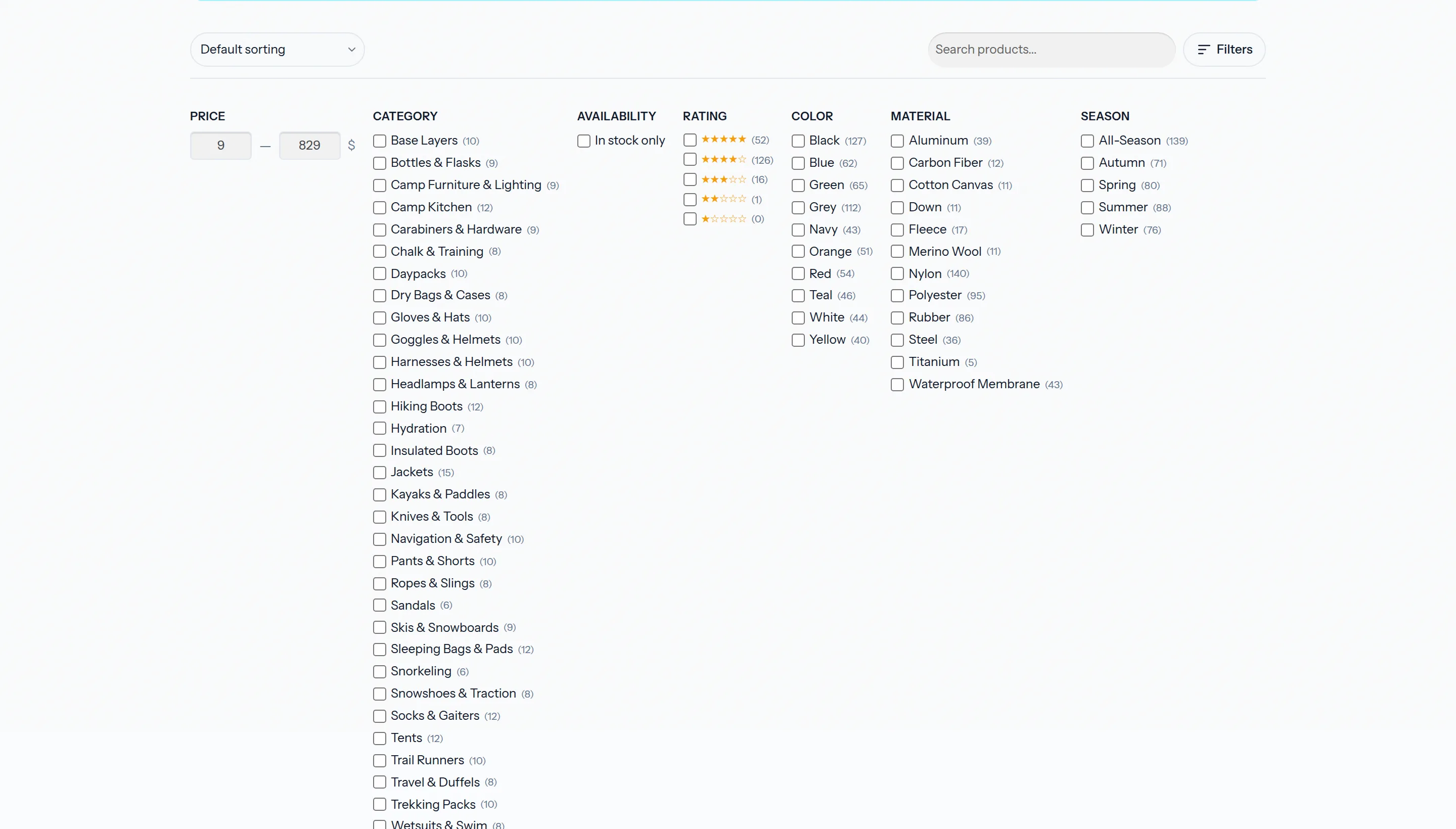
What You Get
- Price range (numeric inputs, min/max from index)
- Category checkboxes (with counts)
- Stock availability toggle
- Star-rating filter
- Product attribute taxonomy filters (
pa_color,pa_size, …) — one group per attribute - A keyword search field (optional)
- Sort dropdown using WooCommerce's native options
- Active-filter pills with one-click clear
- AJAX pagination — page through filtered results without a reload
- A live result count ("Showing 13–24 of 270 results") in the toolbar
- Back/forward browser navigation via
history.pushState
Everything renders into the standard WooCommerce shop loop — no shortcode or block to place.
Prerequisites
- WooCommerce is active
- A Products index exists and has been rebuilt
- A WooCommerce Shop Browse search area is configured in CelerSearch → Settings and enabled, pointing at the products index
- The Shop Filters feature is enabled on that area (toggle the option and pick a display style)
- The master Enable CelerSearch switch is on
How It's Delivered
The filter bar is rendered server-side on woocommerce_before_shop_loop (priority 15). On page load CelerSearch runs a single Meilisearch query with limit: 0 and facets enabled to collect:
- Facet distribution (category counts, attribute counts, rating buckets, in-stock counts)
pricefacet stats (min/max) used to seed the price inputs
For category or tag archives, that initial query is scoped to the current term so facet counts match the archive.
When a shopper changes a control, the JS posts the full filter state to:
GET /wp-json/celersearch/v1/shop-filter
The endpoint re-queries Meilisearch, renders products with wc_get_template_part('content', 'product') (so your theme's product template is honoured), and returns:
{
  "html":  "<li class='product'>…</li>…",
  "facets": {
    "taxonomies.product_cat":   {"Shoes": 12, "Shirts": 8},
    "in_stock":                 {"true": 18, "false": 2},
    "ratings.average_rating":   {"1": 2, "2": 3, "3": 5, "4": 7, "5": 3},
    "taxonomies.pa_color":      {"Blue": 10, "Red": 5}
  },
  "price_range": {"min": 0, "max": 500},
  "total": 42,
  "pages": 3,
  "page":  1,
  "per_page": 12
}
The JS swaps the product grid, recomputes facet counts, re-renders the pager, and updates the URL with WooCommerce-native params so the page is shareable and bookmarkable.
Display Styles
Pick a style in Settings → Search Areas → Shop Filters:
| Style | Behaviour |
|---|---|
| Slide-out Drawer (default) | Toolbar with "Filters" button opens a side drawer. Good on any viewport, ideal for mobile. |
| Inline Bar | Collapsible panel expands inline beneath the toolbar. Traditional desktop layout. |
Both styles share the same toolbar that contains the sort dropdown, the optional keyword search input, the Filters toggle, and the active-filter pills.
Pagination
Filtered results paginate over AJAX. Once the JS takes over the grid, WooCommerce's native pagination (which points at the unfiltered archive) is hidden and CelerSearch renders its own pager after the product grid:
.cs-pagination— prev/next plus a numbered window (current ±2 with ellipsis), driven by thepages/pagefields of the REST response. Clicking a page fetches it over AJAX and scrolls back to the top of the grid..cs-result-count— a live "Showing 13–24 of 270 results" span in the toolbar, computed fromper_page.- URL state — the page rides the URL as
?paged=N(only when above page 1). This form is safe on shops used as the site's front page (where/page/N/permalinks collide with WordPress'spagequery var) and reloads server-render correctly because query interception reads thepagedquery var.
Changing any filter, the sort, or the keyword resets to page 1. Browser back/forward restores both the filters and the page.
Facet Fields
Filters only appear when the matching attribute is both filterable on the products index and returned in the facet distribution. Out of the box CelerSearch considers:
- Everything under
taxonomies.*(product categories, tags, and anypa_*attribute taxonomies registered in WooCommerce) in_stockratings.average_ratingprice(always added, used for price range inputs)
To add more, mark the attribute as filterable in the index's settings (see Index Settings) and rebuild.
Smart counts
Facet counts are self-excluding: each active facet's options are recounted with its own filter removed (all other filters still applied), so selecting "Red" doesn't zero out the sibling color counts. All recounts run in one batched native /multi-search call — the same disjunctive-faceting engine that powers view facets.
URL Parameters
Filters write to the URL using WooCommerce's native shop params, so CelerSearch pages are backwards-compatible with theme-level filter widgets and links from elsewhere:
| URL param | Filter |
|---|---|
min_price=50&max_price=200 | Price range |
filter_pa_color=blue,red | Attribute taxonomy |
rating_filter=4,5 | Rating |
filter_stock_status=instock | Stock |
product_cat=shoes | Category |
orderby=price | Sort |
paged=3 | Page (AJAX pagination; omitted on page 1) |
popstate restores the previous combination on browser back/forward.
Theming
The filter UI is written in BEM-style classes scoped under .cs- and exposes CSS custom properties at the :root level:
:root {
  --cs-primary:         #2563eb;
  --cs-primary-hover:   #1d4ed8;
  --cs-border:          #e5e7eb;
  --cs-border-focus:    #93c5fd;
  --cs-count-color:     #6b7280;
  --cs-bg:              #f9fafb;
  --cs-pill-bg:         #eff6ff;
  --cs-pill-border:     #bfdbfe;
  --cs-text:            #111827;
  --cs-text-muted:      #6b7280;
}
Override any of them in your theme to recolour the bar without touching plugin CSS. Key class hooks:
.cs-shop-filters,.cs-filters-toolbar,.cs-filters-toggle,.cs-active-filters,.cs-active-pill.cs-filter,.cs-filter__heading,.cs-filter-list,.cs-filter__checkbox,.cs-filter--stock.cs-price-range,.cs-price-currency,.cs-price-separator.cs-drawer,.cs-drawer__header,.cs-drawer__body,.cs-drawer__footer.cs-filters-collapsible(inline style).cs-count,.cs-stars,.cs-sort-select,.cs-search-input
A celersearch-shop-filters-active body class is added on pages that render the bar, so you can hide WooCommerce's default .woocommerce-ordering or result-count where needed.
REST Endpoint Reference
GET /wp-json/celersearch/v1/shop-filter
| Param | Type | Default | Description |
|---|---|---|---|
q | string | "" | Keyword (from the optional search field) |
filters | JSON string | "{}" | Current filter state |
sort | string | "" | One of price, price-desc, popularity, rating, date |
page | int | 1 | Page number |
per_page | int | WooCommerce setting | Products per page |
index_id | int | from settings | Overrides the index resolved from the shop-browse area |
filters shape (only set what's selected):
{
  "price":                  {"min": 50, "max": 200},
  "taxonomies.product_cat": ["Shoes"],
  "in_stock":               true,
  "ratings.average_rating": [4, 5],
  "taxonomies.pa_color":    ["Blue", "Red"]
}
Customizing the Response
celersearch_shop_filter_response filters the endpoint's payload before it's returned — add fields for custom JS, or post-process the rendered HTML:
add_filter('celersearch_shop_filter_response', function (array $payload, WP_REST_Request $request) {
    $payload['banner'] = get_option('my_shop_banner');
    return $payload;
}, 10, 2);
The payload contains html, facets, price_range, total, pages, page, and per_page.
Customizing the JS Config
The PHP filter celersearch_shop_filters_js_config lets you alter anything passed to the browser (REST URL, nonce, label strings, pre-selected context filters, and the map of filter sections JS uses to mount missing groups dynamically):
add_filter('celersearch_shop_filters_js_config', function ($config) {
    $config['i18n']['noResults'] = __('Nothing matches those filters.', 'my-theme');
    return $config;
});
Troubleshooting
Bar doesn't render. The area resolver requires all four conditions: master switch on, shop-browse area enabled, filters feature enabled, and a valid index_id on the area. Any missing piece and ShopFilters::render_filter_bar() exits early.
Facet missing from the bar. CelerSearch only renders a filter when the facet distribution contains it. Mark the attribute filterable on the products index and rebuild so it shows up.
Wrong price range. Price range inputs come from Meilisearch's getFacetStats() on the price attribute. If price isn't filterable on the index the stats are empty and the range is hidden.
Counts look stale. Facet counts reflect the index, not the database. Sync the index (real-time sync or a rebuild) to refresh them.