Dynamic Search Rules
Rules pin specific documents at fixed positions when a query matches your conditions — classic merchandising ("someone searched christmas, show these three products first"). They're managed per index in the Rules section of Index Settings (under the Merchandising category).
Rules are built on Meilisearch's Dynamic Search Rules (DSR) API: they're stored on the Meilisearch instance itself and applied by the engine, not by WordPress.
Requirements
- Meilisearch 1.41 or newer — DSR shipped in v1.41.0.
- The
dynamicSearchRulesexperimental flag enabled on the instance.
When either is missing, the Rules section renders a locked panel with the detected reason and step-by-step enablement instructions, including this request (substitute your own host and master key):
curl -X PATCH 'http://localhost:7700/experimental-features' \
  -H 'Authorization: Bearer masterKey' \
  -H 'Content-Type: application/json' \
  --data '{"dynamicSearchRules": true}'
The flag persists in the Meilisearch data volume, so you only run this once per instance. The panel's Recheck button re-probes the engine; the probe result is cached for 5 minutes.
Anatomy of a Rule
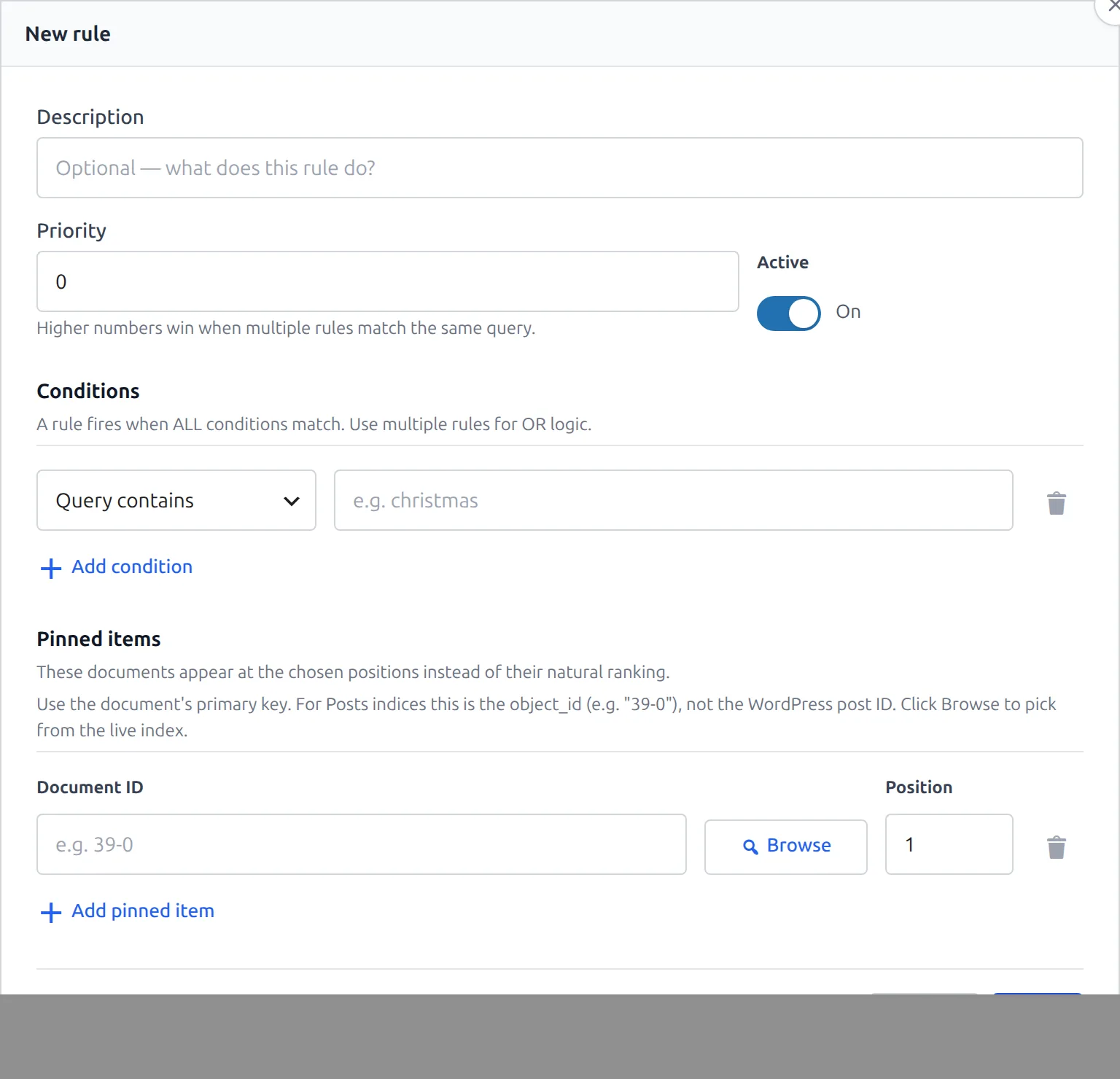
| Part | Behavior |
|---|---|
| Description | Optional label — what the rule does. |
| Priority | Number; higher numbers win when multiple rules match the same query. |
| Active | On/Off. Inactive rules are ignored; toggle straight from the rules list. |
| Conditions | A rule fires when ALL conditions match (AND). Use multiple rules for OR logic. |
| Pinned items | Document ID + position pairs. Each pin's position must be unique within the rule. |
Two condition types are available:
- Query contains — the search query contains the given value (e.g.
christmas). - Query is empty — matches empty-query (browse) searches.
For pinned items, use the document's primary key — for Posts indices that's the object_id (e.g. 39-0), not the WordPress post ID. The Browse button opens the Index Browser in pick mode so you can select documents from the live index instead of typing IDs.
The form validates that a rule has at least one condition, at least one pinned item, no duplicate positions, and a value for every "Query contains" condition.
How Rules Are Applied
Saves go straight to the Meilisearch instance via the DSR API — there's no separate "publish" step. Because the engine applies matching rules itself, pins take effect on searches against that index. Deleting a rule removes it from Meilisearch immediately, and matching queries revert to natural ranking.
The v1 form edits query-scope conditions only. Rules created directly through the DSR API with other condition scopes (e.g. time-based) keep their full definition on the server, but only the editable parts appear in the form.
Rules vs. Pinned Searches
CelerSearch also ships Pinned Searches (the Pinned Searches row action on the Indices list) — a WordPress-side feature that maps a search term to a hand-picked, ordered set of records: with Exact match those records replace the normal results, with Contains match they're pinned on top with normal results below. Pinned Searches work on any engine version; Rules require Meilisearch 1.41+ but run inside the engine itself.
Developer Hooks
celersearch_apply_pinning
Controls whether the main-query interception path applies Pinned Searches. Defaults to true for non-admin areas (pinning is storefront-facing).
// Never apply pinned searches for logged-in editors
add_filter('celersearch_apply_pinning', function ($apply, $query, $area_type) {
    return current_user_can('edit_posts') ? false : $apply;
}, 10, 3);
celersearch_pinned_search_max_records
Caps how many records can be pinned to a single pinned search (default 100).
add_filter('celersearch_pinned_search_max_records', fn() => 50);
Next Steps
- AI Semantic Search — meaning-aware hybrid search per index
- Creating indices — the Index Browser used by the pin picker
- Search hooks — the query interception surface