Creating Indices
Indices describe what content is searchable and how it's shaped in the search engine.
Built-in Index Types
| Type | Indexes | Notes |
|---|---|---|
| Posts | WordPress posts, pages, custom post types | Configurable: which post types to include |
| WooCommerce Products | WooCommerce products | Configurable: exclude sold-out products, exclude hidden/catalog-only products |
| WooCommerce Orders | WooCommerce orders (admin search only) | Configurable: order statuses. Powers fast order lookup in wp-admin |
| Users | WordPress users and membership profiles | Configurable: roles to include and optional email indexing for admin search. Powers wp-admin user search and BuddyPress member directories |
The WooCommerce Products and WooCommerce Orders types only appear when WooCommerce is active. Extra types appear when other plugins register them via celersearch_supported_indices.
Posts — default fields
object_id, id, post_id, type, type_label, status, title, content, excerpt, author (id/display_name/url/login), taxonomies and taxonomies_hierarchical (categories, tags, custom taxonomies), images, permalink, created_at / created_at_formatted, updated_at, comment_count, menu_order, is_sticky.
WooCommerce Products — default fields
object_id, post_id, post_type, post_type_label, post_title, post_excerpt, content, short_description, sku, price, regular_price, sale_price (each with a _formatted variant), currency_symbol, taxonomies, taxonomies_hierarchical, attributes, total_sales, ratings (total_ratings / average_rating), physical_attributes, in_stock, stock_quantity, catalog_visibility, images, permalink, status, post_date, post_modified. Variable products additionally get max_price, max_price_formatted, variations_count, and a nested variations[] array — see Product Indexing.
WooCommerce Orders — default fields
object_id, order_id, number, status, status_name, date_timestamp / date_formatted, order_total / formatted_order_total, items_count, payment_method_title, shipping_method_title, customer, billing, shipping, items (id/name/qty/sku), edit_url.
Users — default fields
object_id, id, user_id, user_nicename, display_name, first_name, last_name, roles,
role_names, registered_timestamp / registered_formatted, avatar_url, description, and
profile_url. Email is opt-in and reserved for admin search output. When BuddyPress Extended
Profiles are active, non-empty public fields are added under xprofile — see the
BuddyPress integration.
Creating an Index (Admin)
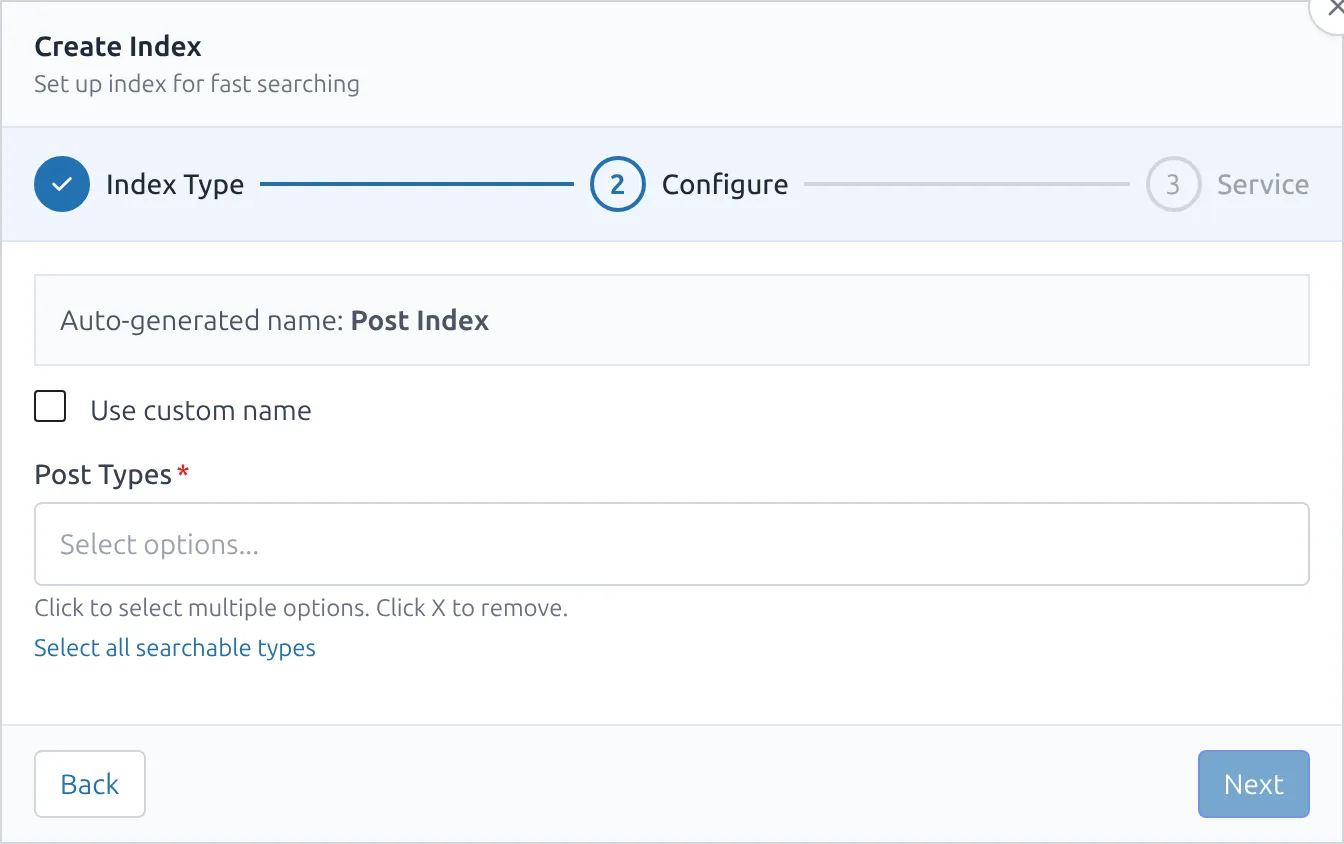
CelerSearch → Indices → Add Index opens a 3-step wizard:
- Select Type — Posts, Users, WooCommerce Products, WooCommerce Orders, plus anything registered via
IndexFactory::get_supported_indices(). - Configure — the type's declared fields (e.g. Post Types for the Posts index). A suggested name is generated from your selections (e.g. Posts (Post, Page)); tick Use custom name to override it.
- Select Service — which previously-configured service the index should live on.
On save, a URL-safe slug is auto-generated with -1, -2… suffixes if the base slug already exists.
Tuning an Index (Settings UI)
Click an index's name in the list to open Index Settings. This is the admin equivalent of calling the IndexSettings builder from code.
Sections:
- Attributes — pick searchable, filterable, and sortable attributes; searchable attributes are drag-orderable (order = relevance priority). Human-readable labels come from
celersearch_filterable_attribute_labels. - Synonyms — equivalent-terms groups (
couch ↔ sofa,t-shirt ↔ tee ↔ tshirt). - Typo tolerance — enable/disable, min word size for one/two typos, per-word and per-field opt-outs.
- Stop words — pick a language preset or define your own list.
- Ranking rules & word proximity — reorder how results are ranked and trade relevance precision for speed.
- Content splitting — split long
contentinto multiple records per post (per-index toggle). Records are automatically de-duplicated in the frontend via the distinct attribute so splits behave like a single hit. - AI Semantic Search — enable an embedder for meaning-aware (vector) search blended with keyword search. See AI Semantic Search for setup and Meilisearch version requirements.
- Impact indicators — hints next to each section flag whether changes are auto-applied by the engine or require a rebuild.
Most changes push to the service immediately on save. Settings that require re-analysing documents (like toggling content splitting) prompt a rebuild.
Inspecting What's Actually Indexed
From the Indices table, open the Browse action to launch the Index Browser modal. It lets you:
- Run queries against the index with live typo tolerance
- Apply filters against the engine's real filterable-attribute config
- Inspect individual documents as JSON (verify custom fields added via hooks)
It's the fastest way to confirm that filter-added metadata actually landed in the index.
Rebuilding
Rebuild deletes the remote index, recreates it, pushes settings, and then pages through candidates in batches. Progress is visible in the modal. Admin rebuilds use the batch size from Settings → General (default 100, range 10–500).
Outside the admin (WP-CLI without --batch, filter-driven code paths) the batch size falls back to the filter default of 15:
// Global batch size
add_filter('celersearch_indexable_items_batch_size', fn() => 50);

// Per-index (uses the index slug)
add_filter('celersearch_products_indexable_items_batch_size', fn() => 25);
Queue Error Visibility
When a background sync fails (e.g. the engine is briefly unreachable), the failure is recorded in a sync error log you can read programmatically (see Real-time Sync). Pending background jobs are visible under CelerSearch → Settings → Sync, which links through to the full Action Scheduler admin screen (Tools → Scheduled Actions).
Deleting
Deleting an index opens a confirmation modal. On confirm, CelerSearch:
- Deletes the remote index on the search service (best-effort — a failure is logged, not blocking)
- Removes the local record
- Stops real-time sync for the index
Deletion is refused while the index is still referenced — either as the Default Index or by any configured search area. Remove those references first.
Creating Indices from Code
use CelerSearch\Repositories\IndexRepository;

$repo = new IndexRepository();

// Returns an IndexConfig on success, null on failure.
$index_config = $repo->create([
    'name'       => 'My Custom Posts',
    'type'       => 'posts',
    'slug'       => 'my-custom-posts',
    'service_id' => 1,
    'config'     => ['post_types' => ['post', 'page', 'custom_type']],
]);
Note: unlike the admin UI, create() does not auto-generate or de-duplicate the slug — pass a unique one yourself.
To spin up a brand new index type (not just a new instance of an existing type), see Custom Indices.
WP-CLI
For scripting and disaster recovery, CelerSearch ships wp celersearch commands:
# Index ops
wp celersearch index list
wp celersearch index info <id>
wp celersearch index clear <id>

# Full reindex (by ID or slug; --all for every index)
wp celersearch reindex <id>
wp celersearch reindex --all --clear
wp celersearch reindex <id> --batch=50 --from=5
wp celersearch reindex --all --dry-run

# Service ops
wp celersearch service list
wp celersearch service test <id>
Without --batch, CLI reindexing uses the filter default batch size of 15 (not the admin setting).
Next Steps
- Search areas — wire the index into WordPress
- Index settings reference — every
IndexSettingsproperty - Custom indices — register your own content types