Facet Builder
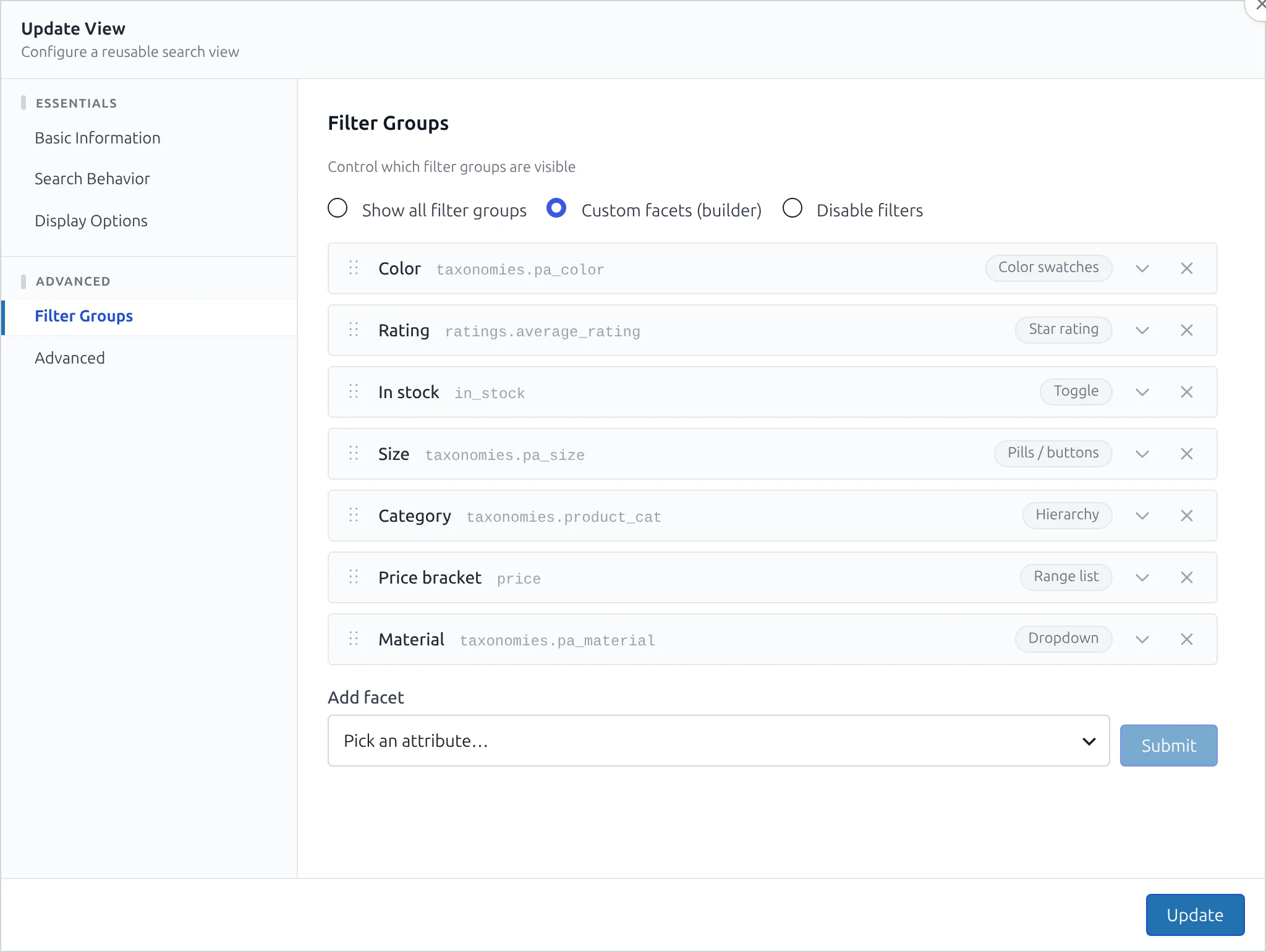
The facet builder turns a View's filter sidebar into something you design, facet by facet: pick the attribute, choose how it renders — checkboxes, pills, color swatches, a range slider, star ratings — and tune matching, ordering, and labels per facet.
You'll find it in the View editor under Facets, with three modes:
- Show all filter groups — every filterable attribute renders as a checkbox list (the automatic default).
- Custom facets (builder) — you choose the facets, their order (drag to reorder), and how each one looks and behaves.
- Disable filters — no sidebar.
Facet Types
Which types an attribute can use depends on the kind of data it holds:
| Type | Renders | Applies to |
|---|---|---|
| Checkboxes | Classic checkbox list with counts | Term-like attributes (taxonomies.*, attributes.*) |
| Pills | Toggleable button chips | Term-like attributes |
| Radio | Single-select list | Term-like attributes |
| Dropdown | <select> — or a searchable multi-select combobox (see below) | Term-like attributes (good for high-cardinality facets) |
| Color swatches | Colored chips from your color map | Term-like attributes (typically pa_color) |
| Hierarchy | Drill-down category navigator (breadcrumb + children) | Hierarchical taxonomies (taxonomies.product_cat, …) |
| Range | Dual-thumb slider or min/max inputs | Numeric attributes (price, sale_price, …) |
| Range list | Predefined buckets ("Under $50", "$50 – $150", …) as checkboxes | Numeric attributes |
| Star rating | "★★★★☆ & up" rows (or exact-match) | ratings.average_rating |
| Toggle | Single on/off checkbox | Boolean attributes (in_stock) |
Per-Facet Options
Every list-style facet (checkboxes, pills, radio, dropdown, swatches) supports:
| Option | Description |
|---|---|
| Label | Heading shown above the facet (defaults to the attribute's label). |
| Match | Any selected (OR) — the default — or All selected (AND): a product must carry every selected value. AND is applied server-side, so "Black AND Blue" returns only products available in both colors. |
| Sort values by | Result count (default) or alphabetical. |
| Value limit | Show the first N values with a "+N more" expander (0 = no limit). Selected values always stay visible, even at zero count. |
| Show counts | Toggle the per-value result counts. |
| Collapsible | Let shoppers collapse the group. |
| Keep empty values (greyed) | "Ghosts": values with zero results under the current filters stay visible — greyed out and unclickable — instead of disappearing, so the facet's shape stays stable while shoppers filter. |
| Value modifiers | Show only these values (include) or Hide these values (exclude), one value per line — trims which indexed values the facet displays without touching the index. Matching is case-insensitive. |
Color swatches
Swatches map each indexed value to a hex color:
- Swatch shape — circle or square.
- Color map — rows of value → color. Click Load values from index to pull the attribute's actual indexed values; common color names ("Red", "Navy", "Forest Green"…) are pre-filled automatically with sensible hex values you can adjust.
- Unmapped values render as a neutral chip showing the value's first letter — the facet never breaks when a new term appears.
Color maps key on term names
Facet values are the term names as indexed. If you rename a product attribute term, update the color map (re-run Load values from index) or the renamed value falls back to the neutral chip.
Dropdown — searchable / multi-select
Two extra options turn the plain <select> into an fSelect-class combobox:
- Multi-select — checkbox rows inside the panel; the closed control summarizes ("3 selected").
- Searchable — a search box inside the panel that filters the facet's values engine-side, using Meilisearch's native
/facet-searchendpoint. It's typo-tolerant and works past the engine'smaxValuesPerFacetcap (default 100) — right for brand-style facets with hundreds of values. Results are scoped by the current search term and every other facet's filters.
The widget calls the new REST route GET /wp-json/celersearch/v1/facet-values (index_id, view_id, facet, facet_query, q, filters) — only facets defined on the view (or filterable attributes, for ad-hoc views) are queryable.
Star rating
- Mode — & up (default): single-select rows reading "★★★★☆ & up" that filter
rating ≥ N, the pattern shoppers know from every large storefront. Exact: the previous behavior — multi-select checkboxes matching exact rating values.
Hierarchy
A drill-down navigator over a hierarchical taxonomy: top-level terms first; selecting one shows its children (with counts), the selected trail renders as clickable ancestor rows, and Any clears the facet. Filtering uses the indexed hierarchical paths (taxonomies_hierarchical.{tax}.lvl0…lvl3), so selecting a parent category matches every product in its subtree. Single-select; up to four levels deep.
Range
- Min / Max — hard bounds for the control. Leave at
0to derive them automatically from the index's facet stats (e.g. the real min/max price of the current result set). - Step — slider/input increment.
- Prefix / Suffix — e.g.
$/kg, used in the control and in active-filter pills ("Price: $10 – $200"). - Control — dual-thumb slider (default) or plain min/max number inputs.
Range list
Admin-defined buckets rendered as multi-select checkboxes — selections combine with OR ("Under $50" or "$150 and up"):
- Ranges — repeatable Min / Max / Label rows. Leave a label empty for an automatic one ("Under $50", "$50 – $150", "$150 and up", using the facet's prefix); leave Min empty to chain from the previous bucket's Max, and Max empty for an open-ended "and up" bucket.
- Each bucket shows a live result count, computed engine-side alongside the smart counts below.
Smart Counts (Disjunctive Faceting)
Naive faceting has an ugly flaw: select "Red" in a color facet and every other color drops to zero — the counts are computed against the already-filtered results, so multi-select facets look broken the moment they're used.
CelerSearch recounts every OR-mode and single-select facet with its own filter excluded (all other facets still applied). Selecting Red keeps Blue's and Green's counts exactly what you'd get if you also picked them — the behavior shoppers expect from every major storefront.
- All recounts run in one batched request using Meilisearch's native
/multi-searchendpoint — onelimit: 0sub-query per active facet, a few milliseconds each. - AND-mode facets keep the narrowed counts — that's what "match all" means.
- Facets with Keep empty values on additionally merge their zero-count values (counted against the unfiltered base) so options grey out instead of vanishing.
- Count sub-queries are keyword-only: with AI Semantic Search enabled, the main query is hybrid but recounts never trigger extra embedding calls.
- If the batched call fails for any reason, the view falls back to plain counts — filtering itself is never affected.
The same engine powers the WooCommerce shop filter bar's counts.
Pagination Extras
Three view-level settings (View editor → Display Options) control how results page:
| Setting | Values | Notes |
|---|---|---|
| Pagination type | Page numbers (default), Load more, None | Load more appends results below the existing grid; filter changes reset the accumulation. |
| Per-page options | Comma list, e.g. 12, 24, 48 | Renders a per-page selector; the choice rides the cs_pp URL param. Empty = no selector. |
| Counts text | Template with [lower], [upper], [total], [page], [total_pages] | e.g. Showing [lower]-[upper] of [total] results. Empty = the default "N results found". |
URLs and Deep Linking
Facet selections ride the URL, so filtered results are shareable and survive reloads:
| Param | State |
|---|---|
cs_f_{attribute}=a,b | List selections (checkboxes, pills, swatches, …). Hierarchy facets store their selected path here. |
cs_r_{attribute}=min..max | Range (either bound may be empty) |
cs_b_{attribute}=1 | Toggle |
cs_pp=N | Per-page selection |
Back/forward navigation restores the full combination — selections, pressed swatches, and slider positions included.
Back-Compat
Views saved with the older Select specific groups mode keep working unchanged — each selected group renders as a checkbox facet. Opening such a view in the editor migrates it into the builder (one checkbox facet per group), and saving persists the new format.
Extending
celersearch:render-facet— a cancelable JSCustomEventfired per facet before insertion; modifyevent.detail.htmlto override a single facet's markup.celersearch_view_config— PHP filter over the whole view configuration, including thefacetsarray, if you need to inject or adjust facets programmatically.
Next Steps
- Views overview — creating and embedding views
- Shop Page Views — run a view (and its facets) as your WooCommerce shop page
- Views hooks