Search Areas
Search areas define where and how CelerSearch intercepts WordPress search queries and which features are enabled in each context.
What is a Search Area?
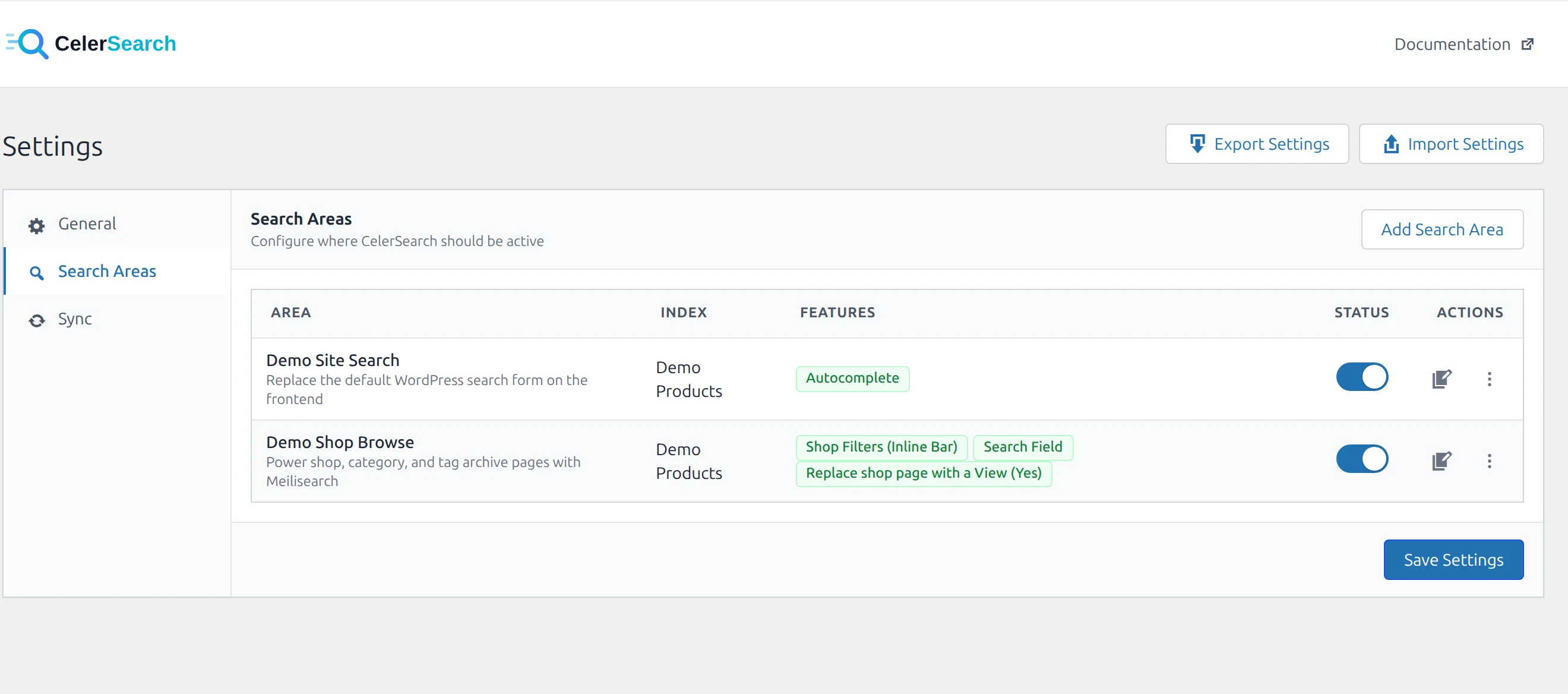
A search area binds a context (frontend search, admin post-type list, shop page, REST API…) to an index. When a query occurs in that context, CelerSearch uses the configured index instead of WordPress's native search, and enables the features you've turned on for that area.
Built-in Search Area Types
| Type | Context | Features |
|---|---|---|
wordpress_public_search | Frontend is_search() main query | Autocomplete, Replace Search Results Page |
woocommerce_product_search | WooCommerce product search widget | Autocomplete |
woocommerce_shop_browse | Shop, category, tag, attribute archives | Shop Filters (drawer/inline), Search Field, Replace shop page with a View |
woocommerce_orders_search | WooCommerce admin orders table | Autocomplete |
admin_{post_type}_search | Admin list table for a public post type | Autocomplete |
admin_users_search | WordPress admin Users table | Autocomplete |
admin_media_search | Media library list | — |
rest_api_search | REST API search requests | — |
buddypress_members_search | BuddyPress members directory | — |
Post admin types are registered dynamically, one per public post type (admin_post_search,
admin_page_search, admin_product_search, …). The BuddyPress type appears only while BuddyPress
is active and must point to a Users index; see the BuddyPress guide.
Configuring Search Areas
- Go to CelerSearch → Settings
- Enable the master Enable CelerSearch switch on the General tab (required for any area to run)
- On the Search Areas tab, click Add Search Area
- Pick a Type, choose an Index, and toggle the features you want
- Each feature with options (e.g. Shop Filters → Display Style) expands to reveal them inline
- Save
Type is fixed after creation
The type dropdown is disabled when editing an existing area to prevent data-integrity issues. Delete and re-create to switch types. Adding a new area of a type that already exists auto-disables the older one — only one area per type can be enabled at a time.
Stored Settings Shape
Settings live in wp_options under celersearch_settings:
[
    'enable_search'      => true,
    'default_index_id'   => 2,
    'fallback_to_native' => true,
    'batch_size'         => 100,
    'search_areas'       => [
        [
            'id'       => 'area_abc123',
            'type'     => 'wordpress_public_search',
            'label'    => 'Main Site Search',
            'index_id' => 1,
            'enabled'  => true,
            'features' => [
                'autocomplete' => [ 'enabled' => true ],
                'search_page'  => [ 'enabled' => true, 'page_id' => 42 ],
            ],
        ],
        [
            'id'       => 'area_def456',
            'type'     => 'woocommerce_shop_browse',
            'label'    => 'Shop Browse',
            'index_id' => 3,
            'enabled'  => true,
            'features' => [
                'filters'      => [ 'enabled' => true, 'style' => 'drawer' ],
                'search'       => [ 'enabled' => true ],
                'view_replace' => [ 'enabled' => false, 'view_id' => 3, 'include_archives' => 'yes' ],
            ],
        ],
    ],
]
Every feature is an object with an enabled flag plus any option keys defined by the area type. AbstractSearchArea::is_feature_enabled($key) is the canonical accessor inside PHP.
Features by Area Type
| Area Type | Feature | Options |
|---|---|---|
wordpress_public_search | autocomplete | results_per_page (1–20, default 5) |
wordpress_public_search | search_page | page_id (page to redirect WP search to) |
woocommerce_product_search | autocomplete | results_per_page (1–20, default 5) |
woocommerce_shop_browse | filters | style = drawer | inline (default drawer) |
woocommerce_shop_browse | search | — |
woocommerce_shop_browse | view_replace | view_id (saved View), include_archives = yes | no (default yes) |
woocommerce_orders_search | autocomplete | results_per_page (1–20, default 5) |
admin_{post_type}_search | autocomplete | results_per_page (1–20, default 5) |
The view_replace feature swaps the whole shop catalog for a saved View — see Shop Page Views.
The Shop Browse area is the only one that intercepts queries without a search term — see celersearch_browse_area_types to register your own browse-style areas.
Context Detection
When a query runs, CelerSearch determines the area type by this chain:
is_admin()→ WooCommerce orders screen →woocommerce_orders_search; media library →admin_media_search; otherwiseadmin_{post_type}_search(customisable via thecelersearch_admin_area_typefilter)defined('REST_REQUEST')→rest_api_search- Product query with a search term →
woocommerce_product_search - Main query on the shop page or a category/tag/attribute archive (no search term) →
woocommerce_shop_browse - Any other main query →
wordpress_public_search celersearch_area_typefilter for custom contexts
Only enabled areas of the detected type participate.
Custom Area Types
Register a new area type from another plugin:
add_filter('celersearch_area_types', function ($types) {
    $types[] = [
        'type'        => 'buddypress_members_search',
        'label'       => __('BuddyPress Members Search', 'my-plugin'),
        'description' => __('Replace BuddyPress member directory search', 'my-plugin'),
        'icon'        => 'dashicons-groups',
        'category'    => 'buddypress',
        'features'    => [
            [
                'key'         => 'autocomplete',
                'label'       => __('Autocomplete', 'my-plugin'),
                'description' => __('Suggest members as the user types', 'my-plugin'),
            ],
        ],
    ];
    return $types;
});

add_filter('celersearch_area_type', function ($area_type, $query) {
    if (function_exists('bp_is_members_directory') && bp_is_members_directory()) {
        return 'buddypress_members_search';
    }
    return $area_type;
}, 10, 2);
Register a matching class via SearchAreaRegistry::register() (extending AbstractSearchArea) so CelerSearch can activate the area and read its feature flags.
Priority When Selecting an Index
When multiple areas could apply, CelerSearch uses this priority:
- Explicit WP_Query parameters —
celersearch_index,celersearch_index_id, orcelersearch => false - Search area config for the detected type
celersearch_select_indexfilter- Default index from Settings
- Native WordPress search when
fallback_to_nativeis enabled
// Force a specific index
new WP_Query(['s' => 'term', 'celersearch_index' => 'posts-news']);

// Disable CelerSearch for a single query
new WP_Query(['s' => 'term', 'celersearch' => false]);
Disabling for Specific Queries
add_filter('celersearch_should_intercept_query', function ($intercept, $query) {
    if ($query->get('my_custom_param')) {
        return false;
    }
    return $intercept;
}, 10, 2);